

Curriculum
ICT
The Subject Way
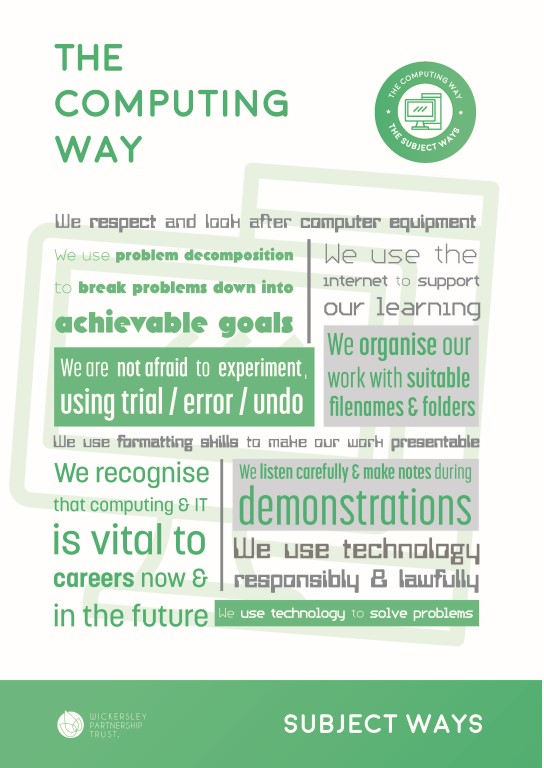
Our subject has a ‘Subject Way’ at the heart of it. Our Subject Way is designed to help students become young subject specialists. The Subject Way has two main purposes:
Firstly, to teach students the vital skills they need to achieve their full potential and gain the very best grades they can. Secondly, to teach students how each subject relates to the wider world, incorporating the life skills they will learn.
It is our belief that knowing how what you learn links to the wider world brings a subject to life and therefore improves overall understanding and engagement.
Curriculum Intent
In ICT and Computing we aim to provide an engaging, challenging, well sequenced curriculum which is broad and balanced, covering a range of computing and ICT topics. To develop our students into 21st Century Digital Citizens who are able to use digital technology safely and responsibly. To teach students both how to use technology effectively, and also an understanding of how it works. The curriculum also prepares students for KS4 options, we offer students the opportunity to study the OCR Creative iMedia and the OCR GCSE Computer Science Course.
How we intend to remove barriers to learning
Literacy
- We give students opportunities to read in lessons when using the internet to research articles required to complete tasks in lessons
- Homework is used to provide students opportunities to read outside of the classroom
- We aim to develop basic IT skills such as typing, word processing and email.
Numeracy
- We make cross curricular links to numeracy and mathematics where possible, examples are evident in our spreadsheet modelling, programming and binary topics.
Oracy
- In order to develop their oracy within a subject specific context pupils are given opportunities to talk about their learning. Staff challenge use of Computing language and will direct pupils towards the correct terminology when appropriate.
- We model effective academic talk and provide opportunities for students to learn through talk.
Vocabulary
- We introduce and explain a range of new subject specific vocabulary.
- Students are introduced to key subject specific vocabulary and have regular opportunities to reinforce their understanding through recap testing. Key computing vocabulary is highlighted to the pupils and pupils are guided to use these in their class work.
How we develop skills for learning
In our subject, Students will develop creative skills by designing and creating Digital Media Products (Videos, Sounds, Websites and Interactive PowerPoints). Students will also develop skills needed to effectively evaluate digital products and determine if they are fit for purpose and fit the needs of the project brief/requirements. Students will develop Analytical skills by debug broken programming code and be able to correct the errors in order to make the code work correctly. Through the writing of programming code students will develop Logical and Computational Thinking skills.
How we foster personal attributes
Aspects of the Wickersley Way are built into the ICT and Computing Curriculum. Students are taught to use ICT equipment safely and responsibly. Students will develop independence skills by undertaking and completing Digital Media projects in the ICT topics. Independence and Resilience skills will also be developed by students learning how to program code in the Computer Science topics. Overall, students will be able to develop fundamental ICT skills which will allow them to apply for a range of Higher Education courses or a range of careers, enhancing their employability when they leave Wickersley.
How we intend to enrich student experiences and broaden the horizons of students
We aim to broaden horizons by introducing software tools that can be used for a wide range of purposes. Many of the tools introduced are free and available for students to use at home. We ensure that students understand how software can be used in the real world, e.g. to plan an event or manage finances. We also introduce students to hardware and software that many students may not have access to outside of school, including Micro:bits, the Adobe suite, Microsoft Office, Chromebooks and PCs. We highlight links to potential career paths in lessons and through classroom displays.
SMSC (Spiritual, Moral, Social, and Cultural)
In ICT students learn about E-Safety, which includes information about protecting their identity online, staying safe whilst using the internet, and the dangers and effects of cyberbullying. Students are also taught how to report abuse. Later in Key Stage 3, students also learn about IT and the law, including Copyright Law (especially relevant for downloading music, games and films). The aim of these topics is to encourage students to consider the moral and social implications of respecting and understanding IT law, and the value aspect of not using social media to cause harm or distress to others.
Curriculum Content
| YEAR 7 | |||||
| Half Term 1 | Half Term 2 | Half Term 3 | Half Term 4 | Half Term 5 | Half Term 6 |
|
Introduction to ICT at Wickersley.
Planning an event using the Google Suite
|
Online Safety
|
Games design with Kodu | Image manipulation | Block based programming with Scratch | Computing fundamentals |
| YEAR 8 | |||||
| Half Term 1 | Half Term 2 | Half Term 3 | Half Term 4 | Half Term 5 | Half Term 6 |
| Control Systems with Flowol |
Micro:bit programming |
Google Sites project |
Data modelling with spreadsheets |
Text based programming with Small Basic | App Design |
| YEAR 9 | ||
| IT is part of of the following suites in Y9: Computing, Economics and IT, IT & Business | ||
| BLOCK 1 | BLOCK 2 | BLOCK 3 |
| Introduction to data and data manipulation Plan, Design and build a UI mini project | Project Planning Image Manipulation | Digital Animation and Sound Safe and effective working practices in ICT |
| YEAR 10 | |||||
| Half Term 1 | Half Term 2 | Half Term 3 | Half Term 4 | Half Term 5 | Half Term 6 |
| Exploring User Interface Design Principles and Project Planning Techniques | Exploring User Interface Design Principles and Project Planning Techniques | Exploring User Interface Design Principles and Project Planning Techniques | Collecting, Presenting and Interpreting Data | ||
| YEAR 11 | |||||
| Half Term 1 | Half Term 2 | Half Term 3 | Half Term 4 | Half Term 5 | Half Term 6 |
| Collecting, Presenting and Interpreting Data | Effective Digital Working Practices | Exams | |||
Department Staff
N Lilleker
Director
- nlilleker@wickersley.net
D Brown
P Cooper
D Finch
I Dickinson
Curriculum Newsletters
Find out more
If you would like more information about our curriculum, please contact the school using the details on our contact page.
Our Subjects at KS4
CORE SUBJECTS
EBACC SUBJECTS
OPTION SUBJECTS